What to Do If Your Email Address Is Leaked in a Data Breach

Temp-Mail.app Team
5/13/2026
Finding out that your email address appeared in a data breach can feel alarming, but it does not always mean your inbox or account has been hacked. In many breaches, an email address is exposed alongside a name, username, phone number, old password hash, or profile details. The risk depends on what leaked and whether you reused the same password elsewhere.
The right response is not panic. It is a calm checklist: verify the breach, avoid suspicious links, change risky passwords, enable stronger account protection, and reduce how often your primary email is exposed in the future.
At temp-mail.app, we treat temporary email as a privacy, spam protection, online safety, and developer testing tool. It can help reduce exposure during appropriate low-risk interactions, but it should never be used for fraud, impersonation, ban evasion, platform abuse, or accounts that require long-term recovery.
This guide explains what to do after an email leak and how to build safer inbox habits going forward.
First, understand what may have leaked
A leaked email address is a warning sign, not a complete diagnosis. The same phrase can describe several different situations.
A breach may expose:
- Only your email address
- Your email address and username
- Your email address and an old password hash
- Your name, phone number, address, or profile details
- Purchase history, support tickets, or account preferences
- Sensitive identity, payment, health, or workplace information
The more personal data involved, the more careful your response should be. If only an email address leaked, the most likely problems are spam and phishing. If a password or sensitive personal data leaked, the risk can include credential stuffing, account takeover, identity misuse, and targeted scams.
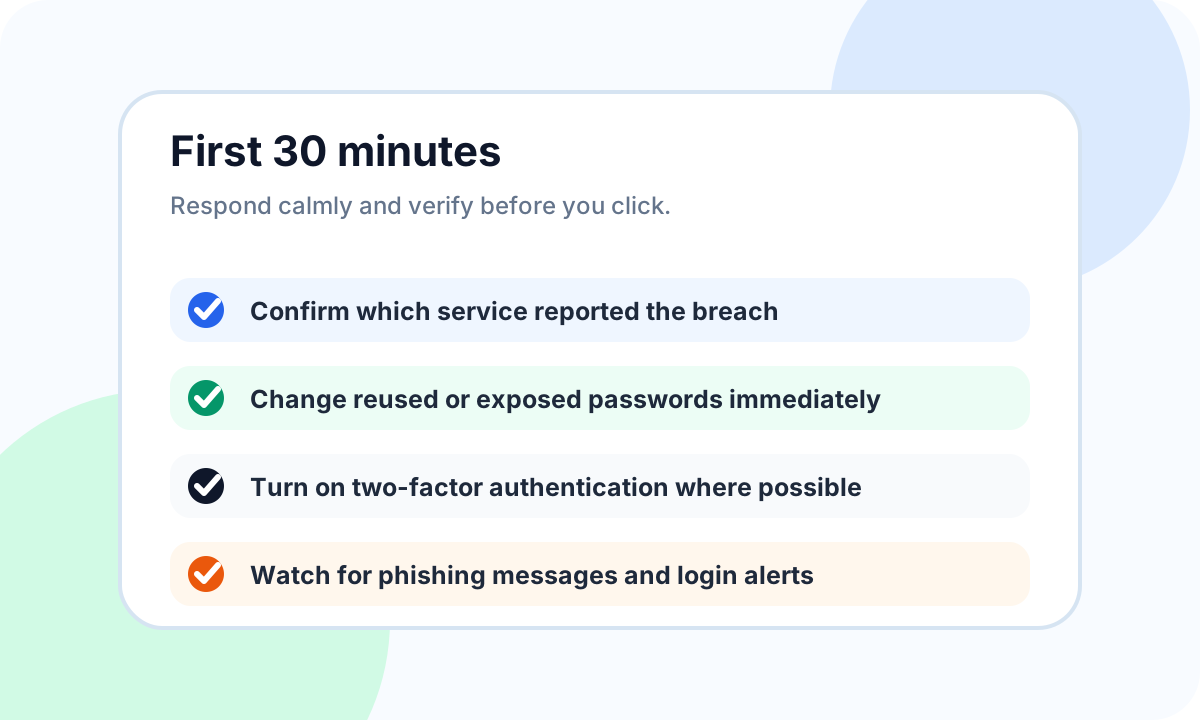
Start by identifying which service was affected and what categories of data were involved. If the breach notice is unclear, go directly to the service's official website or support page rather than clicking links in an email.
Do not click breach warning emails blindly
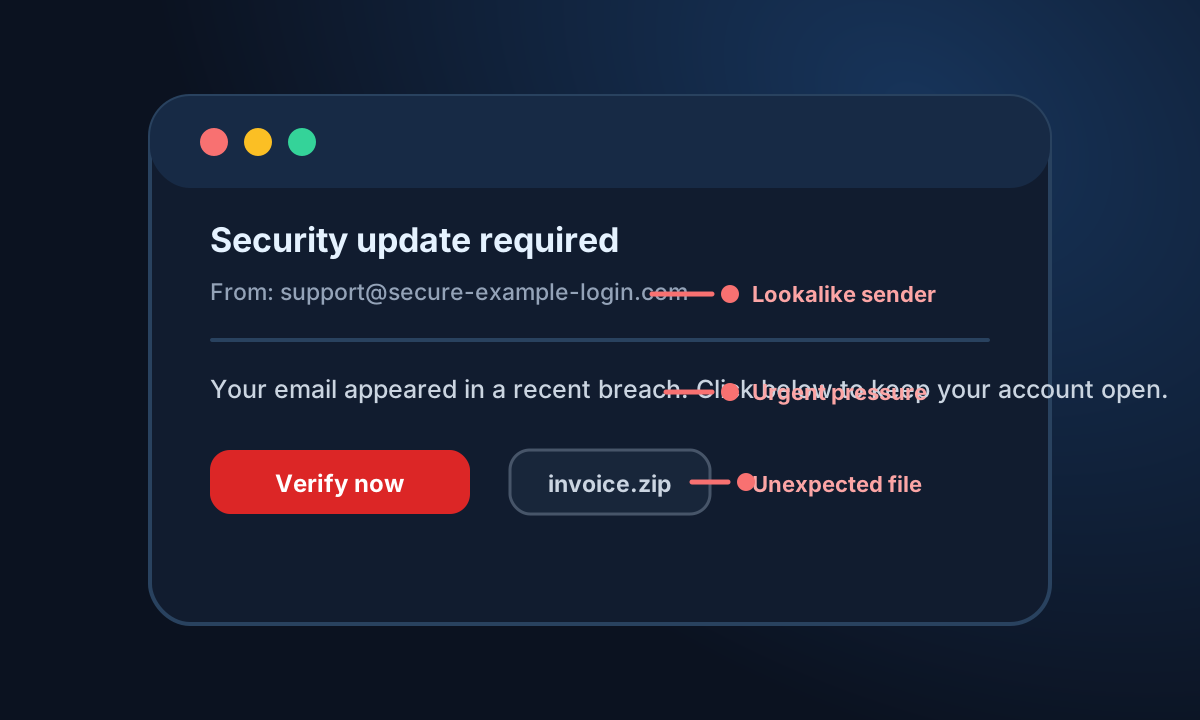
After a public breach, attackers often send fake security alerts. These messages may claim that your account will be closed, your files are exposed, or your password must be confirmed immediately. Their goal is to make you click before you think.
Be careful with emails that include:
- Urgent threats or countdown timers
- Unexpected attachments
- Links to unfamiliar domains
- Requests for passwords or verification codes
- Poorly matched sender names and domains
- Messages that ask you to pay to unlock or protect an account
A safer habit is to open the website directly from your browser, password manager, or a saved bookmark. If a real security issue exists, the account dashboard or official support channel should confirm it.
For important accounts, avoid logging in through links in breach-related emails. A convincing message can still be a phishing attempt.
Change passwords on affected and reused accounts
If the leaked service involved a password, change that password immediately. More importantly, change the same or similar password anywhere else you used it.
Attackers often use credential stuffing: they take exposed email and password combinations from one breach and try them on other websites. This is why password reuse is dangerous even when the original breached site is not important.
Use these rules:
- Every important account should have a unique password.
- Do not reuse small variations such as adding a year or symbol.
- Use a trusted password manager to generate and store strong passwords.
- Prioritize email, banking, payment, cloud storage, work, and social accounts.
- Review saved recovery email addresses and phone numbers while you are there.
Your email account deserves special attention because it is often the recovery key for many other services. If someone controls your primary inbox, they may be able to reset other passwords.
Turn on two-factor authentication
Two-factor authentication adds a second step to login, usually a code, prompt, authenticator app, or security key. It is not perfect, but it can stop many account takeover attempts even when a password is exposed.
When available, use an authenticator app or hardware security key for high-value accounts. SMS-based codes are better than having no second factor, but they can be weaker than app-based or key-based options.
After enabling two-factor authentication, save recovery codes in a secure place. Do not store them only inside the same inbox you are trying to protect.
Good candidates for two-factor authentication include:
- Your primary email account
- Password manager account
- Banking and payment accounts
- Cloud storage
- Work tools
- Domain registrar and hosting accounts
- Social media profiles with public visibility
Watch for phishing and suspicious login alerts
A leaked email address can make future phishing more believable. Attackers may reference an old service, use your name, mention a city, or pretend to be from a company affected by a breach.
Common warning signs include:
- A sender domain that almost matches a real brand but is slightly different
- A message that asks you to confirm a password or one-time code
- A link that points somewhere unexpected when you hover over it
- An attachment you did not request
- A claim that you must act immediately or lose access
- A login alert from a device or location you do not recognize
If you receive a suspicious login alert, visit the service directly and review active sessions, connected devices, and recent activity. Sign out of unknown sessions and change the password if anything looks wrong.
Clean up old accounts that still use your email
Old accounts create long-term exposure. A forum, trial product, abandoned shop, or old app may still hold your email address years after you stopped using it.
After a breach, spend time reducing your account footprint:
- Delete accounts you no longer use.
- Remove unnecessary profile details.
- Update weak or reused passwords.
- Turn off marketing emails you no longer want.
- Replace your primary email with an alias where long-term access is still needed.
- Review connected apps and third-party integrations.
This cleanup lowers the number of places where your primary address can be stored, shared, breached, or used for targeted spam.
If spam has already increased, our guide on How to Stop Spam Emails Before They Reach Your Inbox explains how to reduce exposure at the source instead of only filtering messages after they arrive.
Reduce future exposure of your primary email
Once your primary email is on enough lists, you cannot fully pull it back. What you can do is stop making the problem worse.
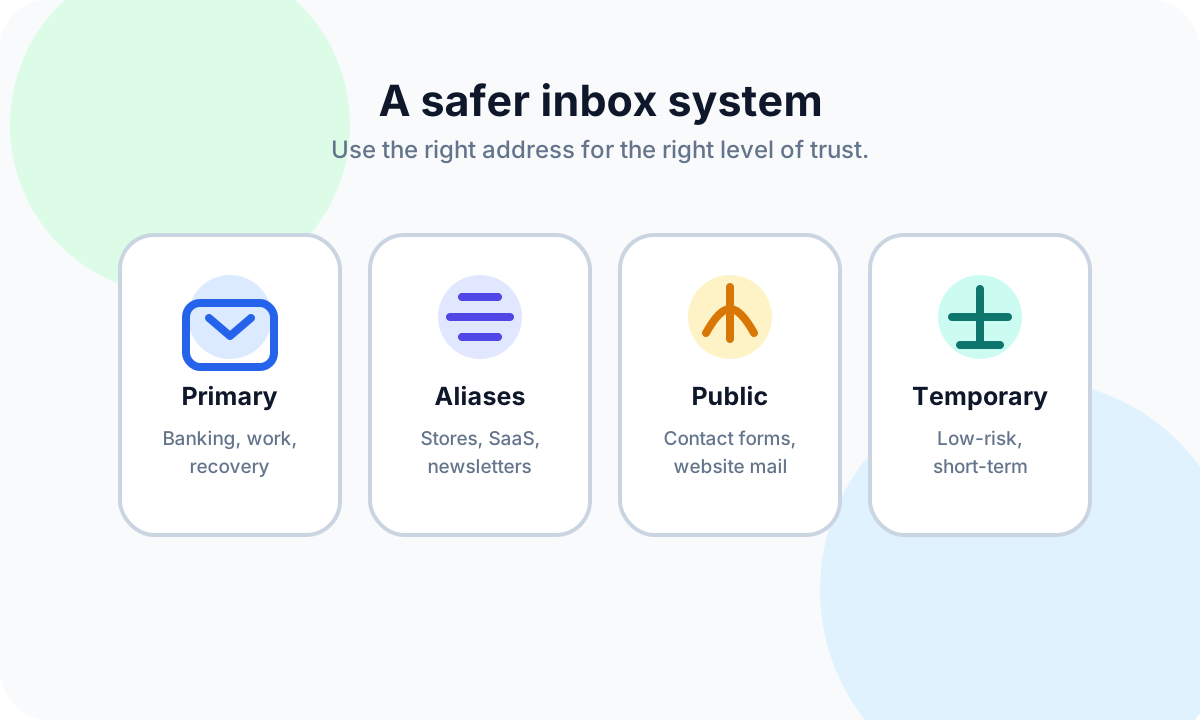
A safer email system uses different addresses for different levels of trust:
- A primary email for banking, healthcare, work, recovery, and identity-related accounts
- Email aliases for stores, newsletters, SaaS products, and communities you may keep using
- A public contact address or form for websites, creators, and business inquiries
- A temporary inbox for low-risk, short-term interactions where you only need one message
This separation limits damage. If a newsletter alias starts receiving spam, your primary recovery inbox stays cleaner. If a low-risk one-time signup does not need a permanent relationship, you do not have to reveal your real address.
For a deeper comparison, read Temporary Email vs Email Alias: Which One Should You Use?. If your main goal is avoiding unnecessary exposure, see How to Avoid Sharing Your Real Email Address Online.
When temporary email can help
Temporary email can be useful after a breach because it helps you avoid giving your already-exposed primary address to every low-trust form. It is best for short-lived, low-risk situations where losing access later would not matter.
Responsible examples include:
- Testing your own signup or email delivery flow
- Evaluating a product demo before deciding whether to create a lasting account
- Receiving a non-sensitive one-time message
- Keeping low-value downloads away from your personal inbox
- Checking how a website sends confirmation or welcome emails
Temporary email is not appropriate for accounts involving money, identity, work, healthcare, government services, purchases, legal obligations, or long-term recovery. It is also not a way to bypass rules, create abusive accounts, evade bans, or mislead platforms.
A simple rule helps: if you may need the account later, use a stable inbox or alias. If the interaction is short-term, low-risk, and does not involve sensitive data, a temporary inbox from temp-mail.app can reduce unnecessary exposure.
Build a safer inbox routine going forward
A breach is a good reason to create better habits. You do not need a complicated security system. You need a few rules you can repeat.
Before entering your email into a form, ask:
- Do I trust this service with my primary address?
- Will I need password resets, receipts, or support later?
- Is this tied to money, identity, work, health, or legal access?
- Could an alias give me continuity without exposing my main inbox?
- Is this only a low-risk, one-time interaction?
Use your primary email for important accounts. Use aliases for ongoing but lower-trust relationships. Use temporary email only when the task is short-lived and safe.
For broader prevention habits, read How to Protect Your Email Privacy in 2026.
FAQ
Is it dangerous if only my email address was leaked?
It can still matter, but it is usually less severe than a password or payment leak. A leaked email address can increase spam, phishing attempts, and account enumeration. You should watch for suspicious messages and make sure important accounts use unique passwords and two-factor authentication.
Should I delete my email account after a breach?
Usually no. Deleting your email account can create recovery problems for accounts that still depend on it. It is often better to secure the inbox, change reused passwords, enable two-factor authentication, and reduce future exposure by using aliases or temporary email where appropriate.
Can changing my password stop spam?
No. Changing a password helps protect account access, but it does not remove your email address from spam lists. To reduce future spam, limit where you share your primary address, use aliases for ongoing signups, and use temporary email only for suitable low-risk interactions.
Should I use temporary email after a data breach?
Temporary email can help reduce future exposure for low-risk, short-term interactions. It should not be used for important accounts, payments, identity services, healthcare, work, purchases, or anything that requires long-term access or recovery.
How can I tell if a breach email is a phishing attempt?
Check the sender domain, avoid urgent links, do not open unexpected attachments, and never share passwords or one-time codes through email. For important accounts, visit the service directly from your browser or password manager instead of using links in the message.
Disclaimer
This article is for general online safety and email privacy education. It is not legal advice, identity theft advice, or professional incident response guidance. If sensitive financial, workplace, healthcare, government, or identity information may be affected, contact the relevant provider, your workplace IT team, or a qualified security professional. Temporary email should be used responsibly for legitimate privacy, spam reduction, and authorized testing, not for fraud, abuse, impersonation, evading platform rules, or creating accounts that require verified identity or long-term access.